The Cost of Running an AI Lab in Local AI
Running Eywalink, an AI company, is cheap at the model layer and expensive everywhere else. Over eight months, one Mac and a server of RTX 5090 (32GB) carried every inference workload for a 5-tenant, 20+ projects development before shipment. The cost equation is dominated by four budgets you can actually control — and the serving engine you pick decides whether those budgets stay in range.
The engine path was: Ollama for the playground, llama.cpp for client demos, vLLM for testing and dev, then SGLang for production. Each stage was a capability decision, not a preference. Below is the cost model, the four-stage engine path, and the vLLM-vs-SGLang numbers that matter when you’re not running one chat — you’re running a company.
The cost model: GPU-as-capex, not LLM-as-bill
Eywalink’s financial model is simple: treat the GPU as a one-time capital expense, keep every software layer open-source, and eliminate the per-token line. The recurring costs that remain are electricity, a cloud API fallback for research and edge reasoning, and a slice of host ops. Everything else — the model (Qwen), the engine (SGLang), the router (LiteLLM), the knowledge layer (Qdrant + Neo4J) — is free at the license level.
That structure is what makes a one-person company viable at all. The offering is productised: a repeatable AI Centre setup, FDE development, and a managed-AI retainer. Each tier is delivered from the same box. Because the marginal compute cost of tenant and projects is near-zero — they share the hardware and the shared-prefix cache — volume scales without the revenue-to-cost curve that kills per-token SaaS margins.
| Cost element | Model | 8-month behaviour |
|---|---|---|
| GPU (RTX 5090, 32 GB) + Mac (32 GB) | CapEx, one-time | Fixed; amortised across all tenants |
| Model weights (Qwen-27B NVFP4) | Free (open weights) | Swap 3.5 → 3.8 in place, no re-buy |
| LLM APIs (openai, claude, deepseek, openroute) | various | Used on clients’ specific demands |
| Serving engine (SGLang) with concurrency 4-8 | Free (open source) | No per-token, no license |
| AI gateway (LiteLLM) | Free | Cost-aware fallback, unified API |
| Knowledge (Qdrant + Neo4J, ~900K points) | Free | Grows with data, not with requests, storage needed |
| Control panel and harness (Paperclip + Dify, Pi, hermes, Codex, Opencode, DSH, custom langgraph) | Free (open source) | grows demanding another 4TB storage |
| Electricity + cloud fallback | Recurring | Small; cloud reserved for research/edge |
The per-token number is the trap. Cloud inference is billed on output tokens; a company running thousands of agent steps a day pays that multiplier every day. On-prem, that line is zero. What you do pay for is the four budgets below — and the engine you run decides which of them run away.
The engine path: Ollama → llama.cpp → vLLM → SGLang
Each engine fit a different phase of the company. Picking the wrong one for the phase is the mistake.
Ollama — the playground
When it earned its place: prototyping, quick prompts, the “does this model do what I need” check. Ollama’s one-line install and model catalog make it the fastest path from zero to a working model.
Why it left: no concurrency, no fine-grained KV control, no metrics. It is a playground, not a serving layer. Every Tier 1 client stack still ships Ollama for the demo layer — that’s fine. It never touches production traffic.
llama.cpp — the client demo
When it earned its place: the on-client-hardware demo. llama.cpp’s quantised GGUF models run on client GPUs the clients already own — the $15–25K AI Centre setup is exactly this: local inference on hardware the client provides. It’s the “your data stays here” proof.
Why it left production: single-stream, CPU/CPU-offload oriented, no production batching or observability. Right for the demo, wrong for twenty in-flight agent sessions.
vLLM — testing and dev
When it earned its place: the development and integration layer. PagedAttention solved KV fragmentation; one-container Docker; huge community. For six months it was the default. Qwen-27B NVFP4, ~150 tok/s single-request.
Why it ceded production: under a real multi-tenant agent workload, two things held it down — no shared prefix cache (each request recomputed the same ~12K-token system prompt) and the KV pool running dry so in-flight requests preempted each other. Per-request speed bounced between 70 and 150 tok/s. For one chat that’s invisible. For five tenants it’s a ceiling.
SGLang — production
When it earned its place: the concurrent agent workload. Two properties the others lack:
- RadixAttention — a global tree of KV blocks shared across every active and recent request. A new request walks the tree, finds the longest matching prefix, and skips recompute. The shared system prompt, tool definitions, and agent context are computed once, served many times.
- Chunked prefill — a long prompt is broken into chunks interleaved with decode, so every in-flight request holds a steady rate instead of stalling while a giant prefill hogs the GPU.
On the agent workload the proof is the KV cache hit rate: ~88% of incoming tokens served from cache, versus near zero on vLLM. For a company where every agent re-sends the same long prefix, that single number is the difference between a working system and one that is ~10× more expensive than it should be.
vLLM vs SGLang at company scale
The terms that matter, defined in one line each:
- TTFT (time to first token) — how long until the first token streams. Prefill-bound; prefix cache directly cuts it.
- TPOT (time per output token) — inter-token latency during decode. What the user feels as “speed.”
- KV cache hit rate — the fraction of input tokens served from cache instead of recomputed. The cost lever.
- Queue time — how long a request waits before the scheduler picks it up. The concurrency lever.
Running five tenants and twenty-plus projects, the GPU sees 8–12 in-flight agent sessions at a time. That’s the number the KV pool and the scheduler are sized for. The comparison:
| Metric | vLLM | SGLang (prod) | What it means for a company |
|---|---|---|---|
| Single-request speed | ~150 tok/s | ~60 tok/s (no MTP) | Irrelevant at 10 concurrent |
| Stable concurrent requests | 1 (long context) | 4–8 | Tenants without starvation |
| Aggregate throughput | ~150 tok/s | ~200 tok/s | More work per GPU-hour |
| Per-request variance | 70–150 tok/s | ~55–65 tok/s | Predictable delivery, predictable SLOs |
| KV cache hit rate | ~0% (no shared cache) | ~88% | The 10× cost line |
| Queue time under load | Spikes (preemption) | Low (chunked prefill) | No tenant stalls mid-task |
| Long-running stability | Drifts 10–20% over 6–8h | No observed drift | No morning restart ritual |
| GPU power | baseline | −20% | Less heat, less fan, less energy bill |
The trade is honest: SGLang’s single-request TPOT is lower (60 vs 150). For a company, that’s the wrong metric to optimise. What you optimise is stable per-tenant delivery and queue time under load. A predictable 60 tok/s for every tenant, every hour, with a near-zero queue, beats an unpredictable 150 that spikes queue time and starves tenant three while tenant two’s long conversation hogs the KV pool.
The four budgets
The engine decides the shape of these; you set the values.
1. Context window — your biggest line item. Every agent step re-sends the full conversation. A twelve-step session with a 12K-token system prompt pays that prefix twelve times: ~144K tokens of recompute in one task. Prefix caching is not an optimisation, it’s a survival mechanism — it collapses that to compute-once. Without it, effective cost is N × actual cost, where N is your concurrent tenant/agent count.
2. Memory fraction — where VRAM actually goes. mem-fraction-static 0.85 splits a 32 GB card into ~16 GB of NVFP4 weights, a large FP8 KV pool, and 15% headroom for a vision model or an embedding model sharing the GPU. Set it deliberately; 1.0 leaves no headroom and the first OOM ends a tenant session.
3. Model routing tax — pay for depth you don’t need. Three tiers on one box: a fast tier for 95% of tool calls, a deep tier (higher max_tokens) for the two or three steps that need extended reasoning, and a cloud fallback for web research. Route by task depth, not habit. Every request that could run on the fast tier but ran deep is a VRAM slot given away for nothing.
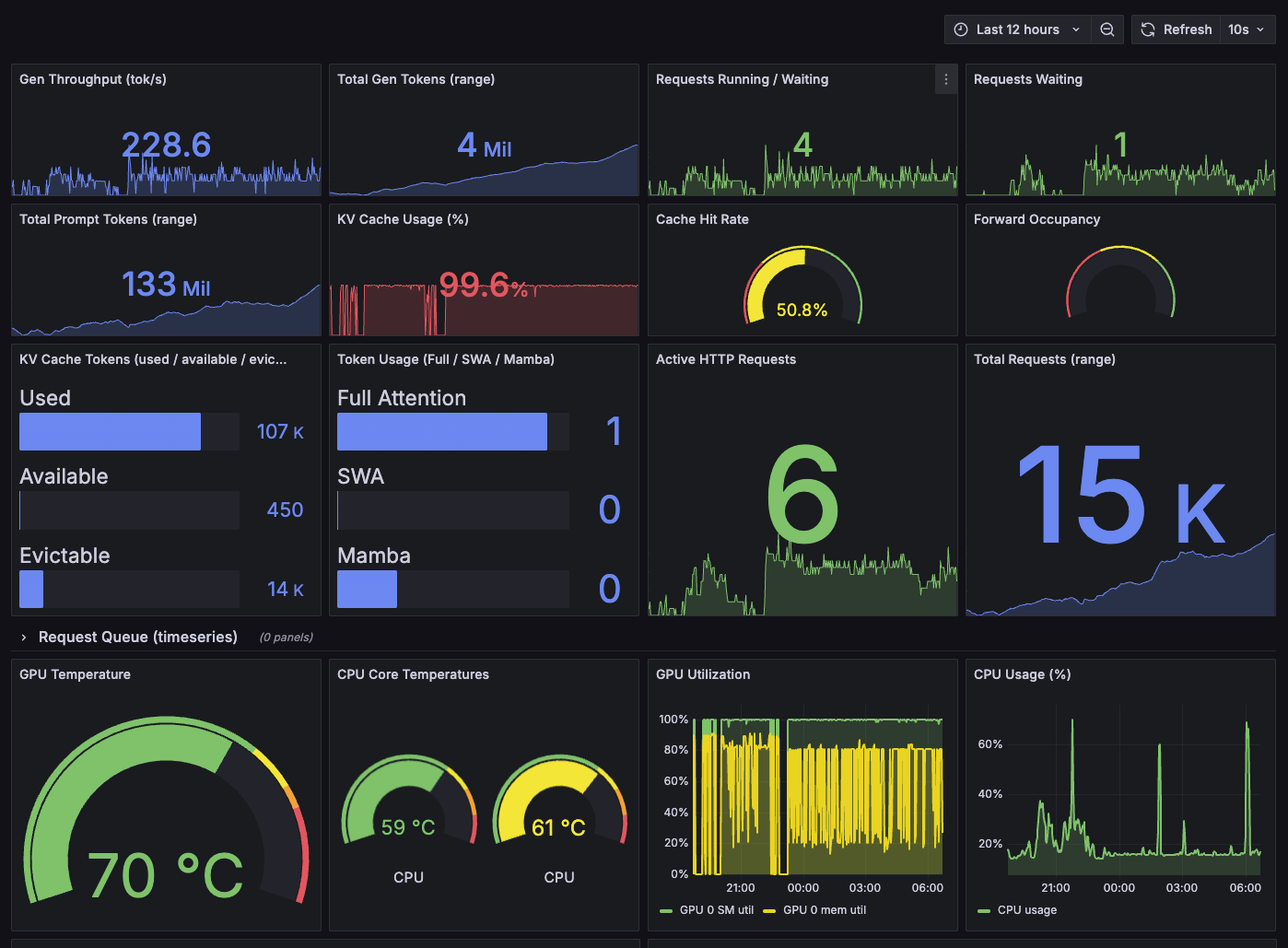
4. Observability gap — you can’t control what you can’t see. A Prometheus + Grafana stack pointed at the engine’s /metrics endpoint. Three panels: cache hit rate (the cost line), GPU memory utilisation (the slow leak that OOMs your 40th session), and request queue depth (tenant stalling). ~50 MB of RAM, and it changes every tuning decision from guesswork to measurement.
Trade-offs, honestly
| Decision | You give | You get |
|---|---|---|
| SGLang over vLLM | Single-request speed | Global prefix cache, stable concurrency |
| NVFP4 over FP8 | Slight quality on creative tasks | 27B fits on one 32 GB card |
mem-fraction 0.85 |
15% of max KV pool | Headroom to run a second model on-GPU |
| Fast-tier routing | Deep reasoning only on demand | 95% of work off the deep tier |
| Cloud fallback for research | Pay-per-token for web tasks | GPU freed for the agentic core |
| Prometheus + Grafana | ~50 MB RAM | Visibility into all four budgets |
The verdict
For a company running many concurrent agents against the same model, SGLang is the production engine. Per-request speed is lower; stability, prefix sharing, and batch efficiency more than compensate, and the −20% power draw is a bonus on the energy line. Ollama and llama.cpp stay where they belong — the playground and the client demo. vLLM remains the dev and MTP layer.
The industry angle is the real point. A one-person AI company running five tenants and twenty projects on a single GPU is not a demo — it’s a cost model that scales with volume instead of against it. The three moves that separate “it works” from “it works at company scale” are the same for any team, any size:
- Prefix caching is non-negotiable for agentic, shared-prefix workloads.
- Memory headroom is a design parameter, not a default.
- Observability is a prerequisite, not a follow-up.
The open-source stack makes all three possible on commodity hardware — which is the whole case against the per-token cloud. When your competitor’s AI bill grows linearly with usage and yours is flat, the moat is the architecture, not the model.
That’s the question worth asking before you buy a cluster: what are your four budgets, and does your engine keep them in range? Let’s talk.